- Agents act through five channels: remote MCP servers, local MCP servers, other agents over A2A, tools the client runs itself such as a shell, and direct API keys.
- The model can be misled by anything it reads. Security has to sit in the path of the action, not in the prompt.
- The controls that hold: one route for tool and agent traffic, an identity on every call, a rule per tool, approval before changes, and data checks on arguments and results.
- Test it. An agent's own tools and instructions are the best source of attacks against it.
What changes when AI can act
Until recently, the risk of AI at work was mostly about data going out: what someone pasted into a prompt. Agents add a second direction. They read files, call APIs, open tickets, push code and message other agents, often with the credentials of the person who set them up.
That changes two things. First, mistakes become actions. A model that misreads an instruction no longer just writes a wrong paragraph. Second, the agent takes instructions from content it reads, not only from the person using it. A web page, an email or a tool result can contain text that redirects it.
Where agents get their reach
| Channel | What it is | Where it can be controlled |
|---|---|---|
| Remote MCP servers | Tools offered over HTTP through the Model Context Protocol: Jira, GitHub, a CRM, an internal API | In the network path between the client and the server, per tool |
| Local MCP servers | Programs started on the user's machine by the AI client, talking over standard input and output | On the endpoint: inventory, sandboxing, and allowlists of servers |
| Other agents (A2A) | Agents calling agents through the A2A protocol, found through an agent card | In the path between the agents, per agent and per message type |
| Client-run tools | Tools the AI client runs itself: a coding agent's shell and file edits, a provider's web search | In the model call, where the tools are declared to the model |
| Direct API keys | Scripts and agents calling a model provider with a key someone created | By routing model calls through a gateway, and finding the keys that are not |
Most organizations have all five, and most have no inventory of any of them. If that is the starting point, read MCP servers are the new shadow AI surface and Your agents are shadow AI with credentials first.
The risks, as the standards describe them
OWASP's LLM06:2025 Excessive Agency describes the core problem: an LLM-based system can be made to perform damaging actions in response to unexpected, ambiguous or manipulated output. OWASP names three causes: excessive functionality, excessive permissions and excessive autonomy. In practice that means an agent that has tools it does not need, tools that can do more than the task requires, and no one checking before it acts.
The OWASP Top 10 for Agentic Applications, published on 9 December 2025, extends this to systems that plan, keep memory, call tools and act with delegated authority. Its first entry is agent goal hijack: an attacker changing what the agent is trying to do through content the agent reads.
For MCP specifically, the protocol's own security best practices list the attacks implementers have to design against, including:
- the confused deputy problem, where an MCP proxy server lets a malicious client obtain authorization without the user's consent;
- token passthrough, where a server accepts tokens not issued to it and forwards them, which breaks audit trails and controls downstream;
- server-side request forgery, where a malicious server points a client at internal addresses or cloud metadata endpoints;
- local MCP server compromise, where a startup command in a client configuration runs arbitrary code with the user's privileges;
- over-broad scopes, where one stolen token opens every tool.
Controls that work
A system prompt that says "never delete anything" is a request, not a control. The model can be talked out of it by the next document it reads. The controls below sit outside the model, in the path of the call.
- One route for tool and agent traffic. When every MCP call and agent message passes one point, rules, records and data checks apply in one place. Tools reached around that point are the ones nobody controls.
- An identity on every call. Know whether a call comes from a person, acting with their own access, or from an agent or service key, acting as no one. The answer decides whose permissions apply and who approves.
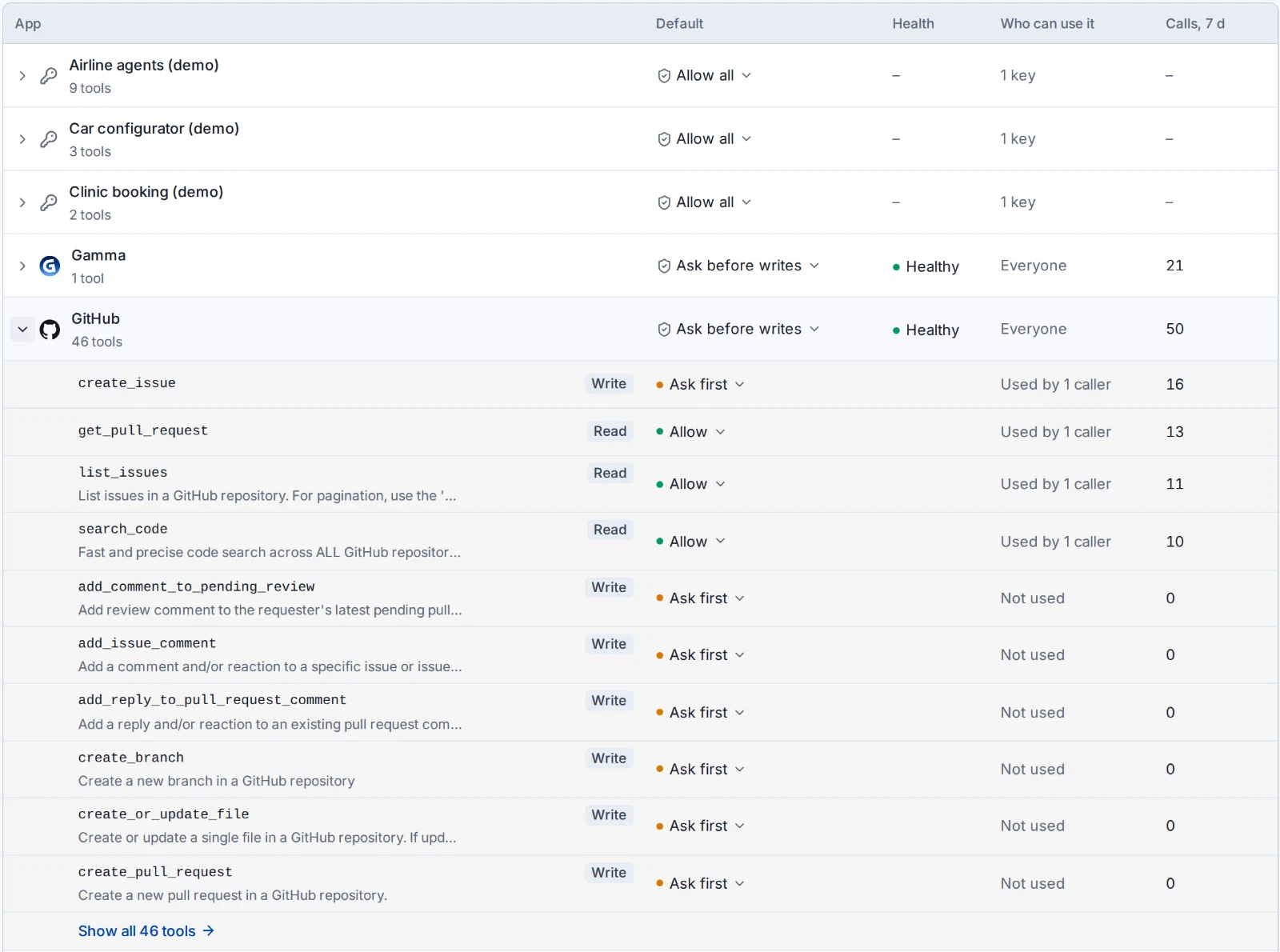
- A rule per tool. Allow, ask first or block, per tool and per team. Reading a ticket and closing it are different tools and deserve different rules. A blocked tool should be hidden from the model, so it is never offered.
- Approval before changes. Hold calls that create, update, delete or send until a person approves them. Who approves depends on who called: the person themselves, or an administrator or named team for agent keys. This is the human-in-the-loop control OWASP recommends for high-impact actions.
- Data checks in both directions. Check tool arguments before the call, for personal data and secrets on the way out, and check results on the way back, which is where injected instructions arrive.
- Limits. Rate limits per tool, budgets per key, and a cap on how long a run can take. A runaway loop then costs a little instead of a lot.
- A record of every call. Who called which tool with which arguments, what decided it, and what it cost. Without it, an incident review is guesswork.
- Testing. Attack the agent with its own tools and instructions before someone else does. See AI red teaming.
MCP firewall, AI gateway, agent firewall: what the terms mean
The market uses several names for overlapping things. Roughly:
| Term | Usually means |
|---|---|
| AI gateway | A proxy for model calls: one API for many providers, keys, budgets, logging, and data rules on prompts |
| MCP gateway or MCP firewall | A proxy for MCP tool calls: which tools a client sees, a rule per tool, approvals, and checks on arguments and results |
| Agent firewall | Rules on what an agent may do, which in practice means MCP and A2A controls plus the tools declared in model calls |
| AI firewall | Inspection of prompts and responses for injection, jailbreaks and data leakage. Often a feature of one of the above. |
What matters is which of the five channels a product actually sits in. A gateway that sees model calls but not tool calls can redact a prompt but cannot stop a delete.
How Unseen does it
Unseen's AI Gateway runs in your environment and covers all three kinds of agent traffic: model calls, tool calls over MCP, and agent-to-agent calls over A2A. Callers use an Unseen key or sign in as themselves, and your provider keys stay with Unseen, not in the apps.
- Your organization's MCP servers are offered to AI clients such as Claude Code, Claude Desktop, Cursor, Codex and VS Code through the gateway, for the people and teams allowed to use them.
- Each app has one set of tool rules, followed by chat, agents and AI clients alike: Allow, Ask first or Block per tool, with rules per team. New apps start with approval required for changes.
- Actions that need approval wait for the right person, with alerts in Slack or Teams.
- Blocked tools stay blocked, for chat, agents and coding tools alike.
- Rules decide which outside agents can be called, by whom, and for what.
- Data policies apply to tool calls and agent messages as well as prompts.
- Every model call, tool call and agent message is recorded with who made it, the rule that decided it and the cost.
- Red teaming attacks an agent or app with tests written from its own tools and instructions, mapped to OWASP and MITRE ATLAS.
What a gateway does not see
A gateway controls what passes through it. Be clear about what does not:
- Local MCP servers that a client starts on a laptop do not cross the network as tool calls. Find them with endpoint inventory and shadow AI discovery, and move the ones that matter to a server the gateway offers.
- Agents that call a provider directly with their own key bypass the gateway. Network-level discovery shows which machines reach AI providers, which is how those keys are found.
That is why we pair the gateway with shadow AI visibility: one shows what goes through the controlled route, the other shows what goes around it.
FAQ
What is an MCP firewall?
An MCP firewall is a control point between AI clients and the MCP servers they use. It decides per tool whether a call is allowed, needs approval, or is blocked, checks the arguments and results for sensitive data, and records every call. It works like an application firewall for tool calls instead of for web requests. Some products call it an MCP gateway.
What is A2A?
A2A (Agent2Agent) is an open protocol for one AI agent to call another. An agent publishes an agent card, a JSON document at a well-known address that lists its name, skills and endpoints, and other agents send it messages and tasks. Version 1.0.0 is the latest released version of the specification.
How do I require human approval before an AI agent takes an action?
Put a rule in the path of the tool call, not in the prompt. A rule that holds calls to tools that create, update, delete or send until a person approves them cannot be talked around by the model. OWASP recommends exactly this for high-impact actions in its guidance on excessive agency.
Is prompt injection an agent security problem?
It is the main one. An agent reads content it did not write: web pages, emails, tickets, tool results. Instructions hidden in that content can redirect the agent, which OWASP lists first in its Top 10 for Agentic Applications as agent goal hijack. Filtering helps, but the reliable limit is on what the agent can do once redirected: least privilege per tool and approval for changes.
Does this work with Claude Code and Cursor?
Yes. Coding tools and other MCP clients such as Claude Code, Claude Desktop, Cursor, Codex and VS Code connect to Unseen's gateway as an MCP server, and call models through its OpenAI- and Anthropic-compatible API with an Unseen key.
See tool rules and approvals on your own agents
We will connect one of your MCP servers or agents to the gateway and walk through the rules, approvals and records with your team.
Talk to us